
Introduction
Smartphones and tablets have evolved into powerful devices capable of replacing many functions of a computer. But to extend their capabilities, an OTG (On-The-Go) cable plays a vital role. Many users wonder what an OTG cable is and why it’s useful. This guide explains everything about OTG cables — from definition and types to uses, benefits, and compatibility.
What is an OTG Cable?
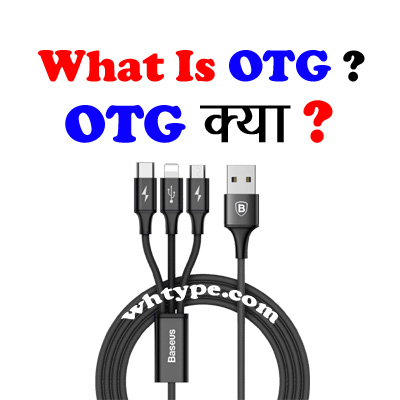
OTG (On-The-Go) cable is a special type of USB adapter that allows a smartphone, tablet, or other device to act as a host and connect directly to USB devices such as flash drives, keyboards, mice, and more.
Normally, USB devices need a PC or laptop as the host to function. With OTG, your smartphone itself acts as the host, enabling direct communication with other USB peripherals.
Technical Definition
- OTG (USB On-The-Go): A standardized specification introduced in 2001 that allows two USB devices to communicate without a traditional computer host.
- Connector type: Usually Micro USB OTG, USB-C OTG, or sometimes Lightning OTG (for iPhones).
- Main feature: One device becomes the host (controller) while the other becomes the peripheral (controlled device).
Types of OTG Cables
- Micro USB OTG Cable – For older Android phones.
- USB-C OTG Cable – For modern Android devices.
- Lightning OTG Cable (or adapter) – For iPhones and iPads (limited functionality).
- OTG Adapter/Connector – A small adapter that converts USB-A to Micro USB or USB-C.
What is an OTG Cable Used For?
OTG cables have multiple uses in daily life. Some common applications include:
1. Connecting USB Flash Drives
Transfer files, videos, music, or documents directly from a USB pen drive to your smartphone.
2. Using Keyboard and Mouse
Turn your phone into a mini-computer by connecting a keyboard and mouse for typing or navigation.
3. Gaming Controllers
Play mobile games with wired gaming controllers (like PS, Xbox, or generic USB controllers).
4. External Hard Drives
Access data from portable HDDs or SSDs (with sufficient power supply).
5. Printers
Print documents directly from a phone by connecting a USB printer (if supported).
6. Digital Cameras
Transfer photos directly from a DSLR or digital camera to your smartphone for quick editing and sharing.
7. USB Internet Dongles
Some OTG-compatible dongles can provide internet access.
8. MIDI Devices / Audio Interfaces
Musicians can connect MIDI keyboards or audio interfaces to phones for recording and production.
9. Charging Another Phone (Reverse Charging)
A phone with OTG support can charge another device, acting like a power bank.
Benefits of Using an OTG Cable
- Eliminates the need for a laptop/PC for many tasks.
- Saves time when transferring files.
- Enables productivity tools like external keyboard and mouse.
- Useful for traveling and backup purposes.
- Enhances gaming and multimedia experience.
Limitations of OTG Cables
- Not all phones support OTG (check in phone settings or user manual).
- Some devices require extra power (e.g., external hard drives).
- Cable compatibility varies (Micro USB vs. USB-C vs. Lightning).
- Continuous usage may drain battery faster.
How to Check if Your Phone Supports OTG
- Settings Method: Go to Settings > Storage > USB > OTG support.
- OTG Checker Apps: Download “USB OTG Checker” from Play Store.
- Manufacturer’s Website: Look at device specifications.
Frequently Asked Questions (FAQs) about OTG
What is the OTG used for?
OTG (USB On-The-Go) is used to connect USB devices like pendrives, keyboards, or controllers directly to smartphones or tablets.
What is the difference between OTG and pendrive?
OTG is a cable/adapter for connectivity; a pendrive is storage.
What is the OTG on my phone?
It’s a feature that lets your phone act as a USB host to connect other devices.
What is the difference between OTG and pendrive?
OTG = connector, Pendrive = storage device.
What is OTG on my phone?
It’s a function to connect USB devices like pen drives or keyboards to your phone.
Is OTG good for mobile?
Yes, it’s safe and useful if the phone supports it.
Which devices support OTG?
Most Android phones, some tablets, and few laptops with USB-OTG function.
What is OTG Bluetooth?
It’s using OTG to connect a Bluetooth dongle to a device.
Is OTG an adapter?
Yes, it’s usually a cable or adapter.
Is USB OTG still used?
Yes, widely used for data transfer and external devices.
Are OTG and flash drive the same?
No, OTG is a connector; flash drive is storage.
Why is my USB OTG not working?
Possible reasons: phone doesn’t support OTG, faulty cable, or disabled setting.
Do I need an OTG adapter?
Yes, if your device doesn’t have a built-in OTG port.
Is OTG for charging?
Mainly for data transfer, but can support reverse charging between phones.
Are OTG cables special?
Yes, they have a specific pin configuration to enable host mode.
How to tell if a cable is OTG?
It’s usually labeled “OTG” or has a micro-USB/Type-C to USB-A female connector.
What is another name for OTG cable?
USB Host Cable.
What is the voltage of OTG?
Standard USB voltage: 5V.
Does OTG have speed?
Yes, depends on USB version (USB 2.0 up to 480 Mbps, USB 3.0 higher).
Is OTG Type-C?
Yes, Type-C OTG cables exist.
Conclusion
An OTG cable is a simple yet powerful tool that expands your smartphone’s functionality. From connecting flash drives and controllers to using keyboards, printers, or even charging other devices, OTG brings computer-like capabilities into your pocket. Whether for work, travel, or entertainment, an OTG cable is an inexpensive accessory that every smartphone user should consider.
Must Read :
- Complete Guide to Network Topology: Types, Applications, Problems & FAQs
- Complete Guide to Network Topology: Types, Applications, Problems & FAQs
- Google Gemini Nano Banana AI Saree Trend: Complete Guide (What, Why, How, When, Where, Who)
- How to Take Screenshot in Laptop (Windows, Mac, and Shortcuts Guide)
- How to Convert Celsius into Kelvin (Formula, Examples & Easy Steps)


























































 WH Type
Leave a reply to OTG Cable क्या है और इसका उपयोग कहाँ होता है? – WH Type Cancel reply